
Codebase
  • Code Repository
  • WordPress Plugins
    • Admin Area Utilities
    • Analytics / SEO / Redirects
    • Backup / Staging
    • Calendar / Scheduling
    • Custom Post Types / Fields
    • Database / Optimization
    • WooCommerce / eCommerce
    • Editor / Custom Code
    • Gravity Forms / Donation
    • Notifications / Popups
    • Search / Filter
    • Sidebar / Widget Areas
    • Social Media
    • User Roles / Membership
  • Resources
    • Types of Redirects
    • Common Image Types
    • Converter – RGB to HEX
    • Converter – HEX to RGB
    • Converter – CMYK to RGB
    • Code Generators
    • Font Awesome Cheatsheet
    • Social Media Image Sizes
  • Sign In
  • Menu Menu

Twitter Image Sizes

Overview

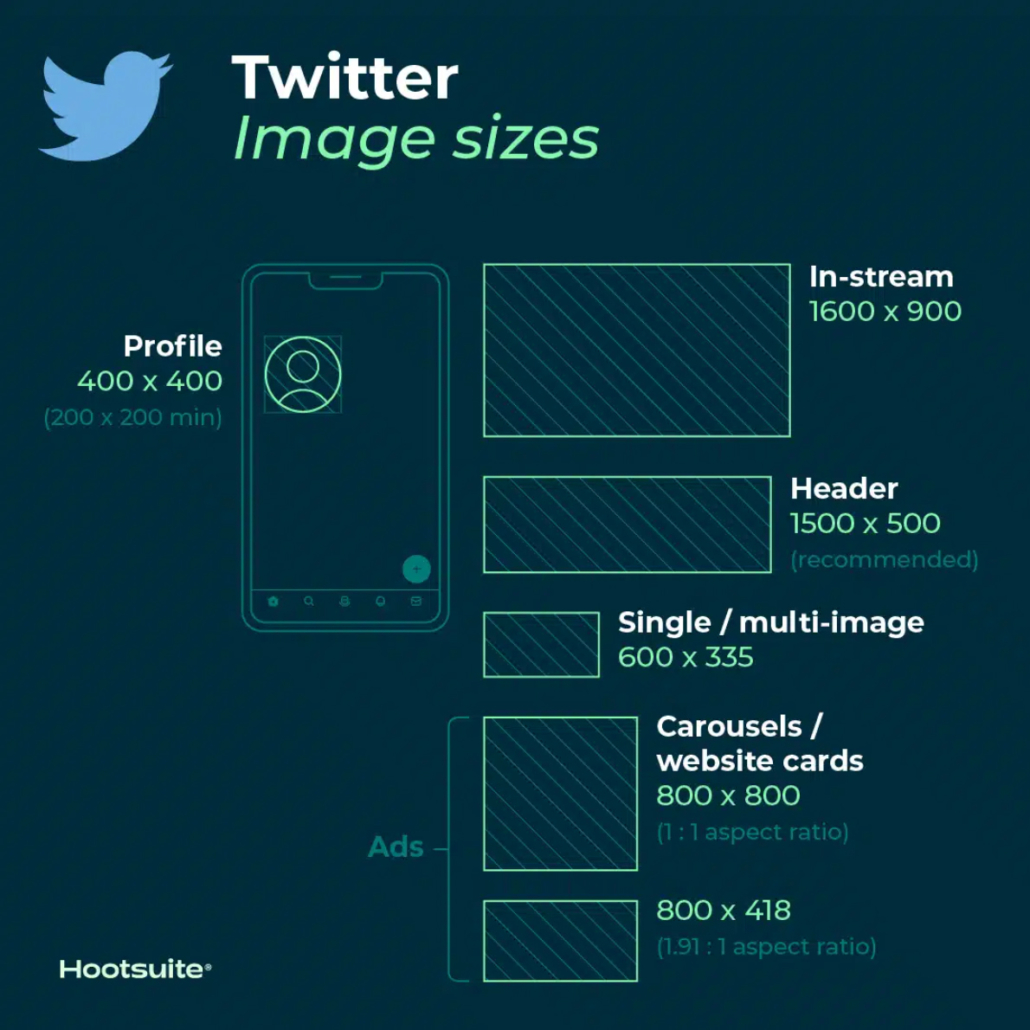
Tweets that include images consistently get more click-throughs, more likes, and more Retweets than non-image Tweets. In fact, Tweets with visual content are three times more likely to get engagement. So, choosing the right images and creating great visual content for Twitter matters. And, of course, that includes getting Twitter image sizes right.

Profile Picture

Twitter Profile Picture

  • Recommended image size: 400 by 400 pixels
  • Minimum image size: 200 by 200 pixels
  • Maximum file size: 2MB

Header

Twitter Header Image

  • Recommended size: 1500 x 500 pixels

Tips:

  • To future-proof the image, it’s best to use the maximum size.
  • Header images are cropped to an aspect ratio of 3:1.
  • Keep in mind that the way header images display changes depending on the monitor and browser being used.

In Stream Photos

Twitter In-stream Images

  • Recommended size: 1600 x 900 pixels
  • Minimum size: 600 by 335 pixels
  • Recommended aspect ratio: any aspect between 2:1 and 1:1 on desktop; 2:1, 3:4 and 16:9 on mobile
  • Supported formats: GIF, JPG and PNG
  • Maximum file size: Up to 5MB for photos and GIFs on mobile. Up to 15MB on the web.

Card Image

Twitter Card Image

Twitter recognizes when a Tweet includes a URL. Twitter then crawls that website, pulling in content, including a Twitter image for the summary card. (This is how it all works, by the way.)

  • Minimum size: 120 x 120 pixels
  • Supported formats: GIF, JPG, PNG
  • Maximum file size: 1MB

Tips:

  • You can test what your Twitter summary card will look like and see a preview using the card validator.
  • There is a range of different Twitter cards, so also a range of sizes. As well as the regular summary cards, there are summary cards with large images, app cards and player cards.

Ads

Twitter Ads

  • Single and multi-image tweets: Minimum 600 x 335 pixels, but use larger images for the best results.
  • Website card image: 800 x 418 pixels for 1.91:1 aspect ratio. 800 x 800 for 1:1 aspect ratio. Max file size of 20MB.
  • App card image: 800 x 800 pixels for 1:1 aspect ratio. 800 x 418 pixels for 1.91:1 aspect ratio. Max file size of 3MB.
  • Carousels: 800 x 800 pixels for 1:1 aspect ratio. 800 x 418 pixels for 1.91:1 aspect ratio. Max file size of 20MB for 2-6 image cards.
  • Direct Message card: 800 x 418 pixels for 1.91:1 aspect ratio. Max file size of 3MB.
  • Conversation card: 800 x 418 pixels for 1.91:1 aspect ratio. Max file size of 3MB.

Resource: Find more information here on how to advertise on Twitter.

Source: https://blog.hootsuite.com/social-media-image-sizes-guide/

Resources

  • Types of Redirects
  • Common Image Types
  • Converter – RGB to HEX
  • Converter – HEX to RGB
  • Converter – CMYK to RGB
  • Code Generators
  • Font Awesome Cheatsheet
  • Social Media Image Sizes
    • LinkedIn Image Sizes
    • Instagram Image Sizes
    • Twitter Image Sizes
    • Facebook Image Sizes
Home1 / Resources2 / Social Media Image Sizes3 / Twitter Image Sizes
dark mode
dark mode enabled

Get ready to find some awesome stuff.

Rob Smelik's Personal Code Repository Version 1.8.3 | Changelog | Copyright 2026 - All rights reserved.
Scroll to top
Account

You must sign in to view this information

  • Home
  • Rellax WordPress Plugin
  • Resources
    • Common Image Types
    • Common Video Resolutions
    • Dictionary
    • Social Media Image Sizes
      • LinkedIn Image Sizes
      • Instagram Image Sizes
      • Twitter Image Sizes
      • Facebook Image Sizes
    • WordPress Dashicons
    • Font Awesome 4.7 Cheatsheet
    • Types of Redirects
    • Converter – RGB to HEX
    • Converter – HEX to RGB
    • Converter – CMYK to RGB
    • Gradient Generator
    • Code Generators
  • Code Repository
  • Login
  • WordPress Plugins
    • Accessibility
    • Admin Area Utilities
    • Analytics / SEO / Redirects
    • Backup / Staging
    • Calendar / Scheduling
    • Editor / Custom Code
    • Custom Post Types / Fields
    • Database / Optimization
    • WooCommerce / eCommerce
    • Gravity Forms / Donation
    • Notifications / Popups
    • Search / Filter
    • Sidebar / Widget Areas
    • Social Media
    • User Roles / Membership
  • Changelog
  • Block – WordPress Plugins
Code Filters
  • Sort Order

  • Code Language

  • Code Group

  • Code Category