
Codebase
  • Code Repository
  • WordPress Plugins
    • Admin Area Utilities
    • Analytics / SEO / Redirects
    • Backup / Staging
    • Calendar / Scheduling
    • Custom Post Types / Fields
    • Database / Optimization
    • WooCommerce / eCommerce
    • Editor / Custom Code
    • Gravity Forms / Donation
    • Notifications / Popups
    • Search / Filter
    • Sidebar / Widget Areas
    • Social Media
    • User Roles / Membership
  • Resources
    • Types of Redirects
    • Common Image Types
    • Converter – RGB to HEX
    • Converter – HEX to RGB
    • Converter – CMYK to RGB
    • Code Generators
    • Font Awesome Cheatsheet
    • Social Media Image Sizes
  • Sign In
  • Menu Menu

LinkedIn Image Sizes

Overview

When you use LinkedIn for business — whether it’s via your personal profile or a company page — pairing your LinkedIn updates with images has consistently been shown to increase comments and sharing. Stick to the recommended sizes below for best results. And always make sure to look at your profile and content on multiple devices before finalizing.

Personal Profile

LinkedIn Personal Profile Images

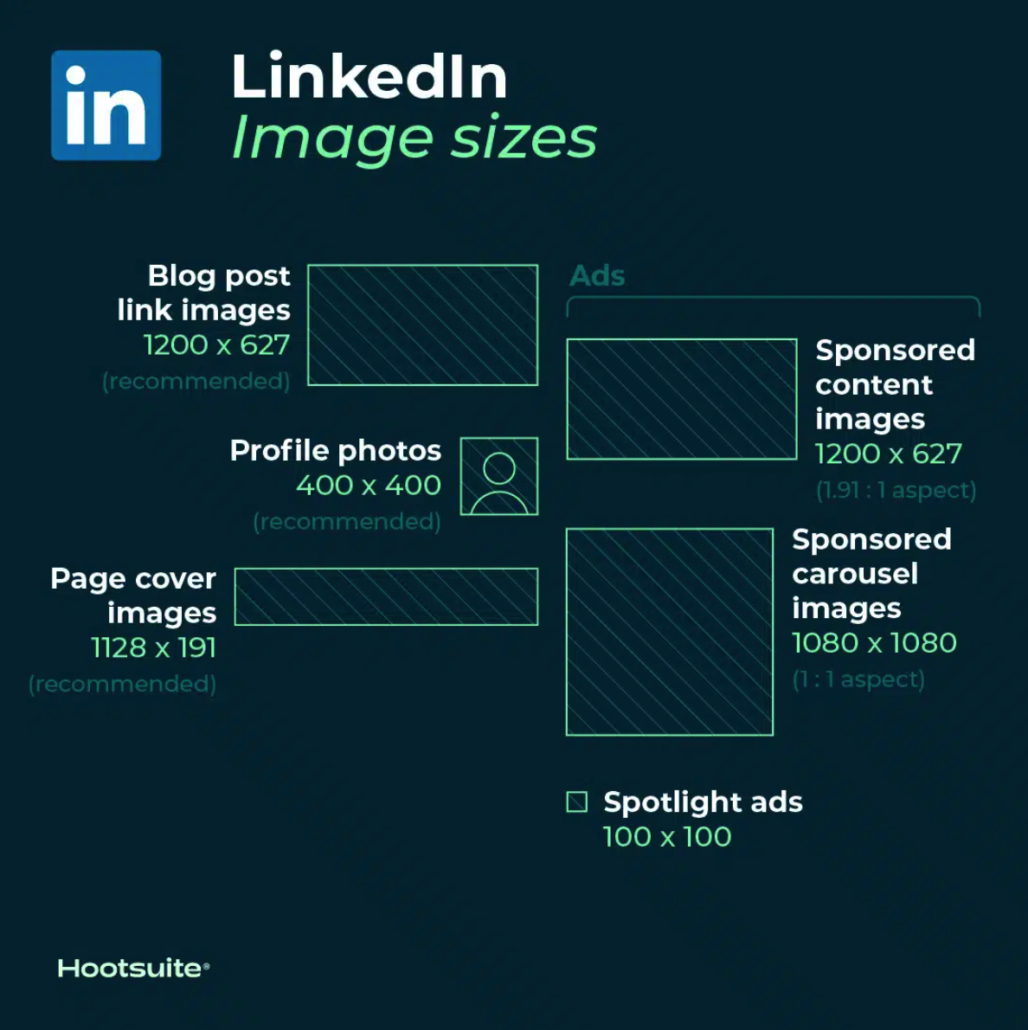
  • Avatar Image: 400 x 400 pixels
  • Banner Image: 1584 x 396 pixels (aspect ratio: 4:1)

Tips

  • LinkedIn can accommodate photos up to 7680 x 4320 pixels.
  • And it can handle files up to 8MB, so upload as large as you can to future-proof.
  • Make sure your file is smaller than 8MB.
  • Cover photos are cropped differently on mobile and desktop. Make sure to view your profile on both kinds of display before finalizing.

Company Pages

LinkedIn Company Pages

  • Company logo size: 300 x 300 pixels
  • Page cover image size: 1128 x 191 pixels
  • Life tab main image size: 1128 x 376 pixels
  • Life tab custom modules image size: 502 x 282 pixels
  • Life tab company photos image sizes: 900 x 600 pixels
  • Square logo: At least 60 x 60 pixels

Tips

  • When posting image updates to your company page, make sure to use PNG or JPG images.
  • Use an aspect ratio of 1.91:1.
  • The recommended LinkedIn post size is 1200 x 628 pixels.
  • This LinkedIn image sizing also applies to LinkedIn Showcase pages.

Blog Posts

LinkedIn Blog Post Images

  • Recommended size: 1200 x 627 pixels

LinkedIn Blog Post Sharing Images

  • Recommended size: 1200 x 627 pixels

When pasting a URL into an update, an auto-generated thumbnail image may appear in the preview if one is available, along with the article or website title. But, you can customize it by clicking the Image icon below the text box and selecting a photo from your computer.

Tips:

  • The image should use a 1.91:1 ratio.
  • More than the minimum of 200 pixels wide.
  • If the image width is less than 200 pixels wide, it will appear as a thumbnail on the left side of the post.

Ads

LinkedIn Ad Images

  • Company logo size for ads: 100 x 100 pixels
  • Spotlight ads logo size: 100 x 100 pixels
  • Spotlight ads custom background image: 300 x 250 pixels
  • Sponsored content images: 1200 x 627 pixels (1.91:1 aspect ratio)
  • Sponsored content carousel images: 1080 x 1080 pixels (1:1 aspect ratio)

Source: https://blog.hootsuite.com/social-media-image-sizes-guide/

Resources

  • Types of Redirects
  • Common Image Types
  • Converter – RGB to HEX
  • Converter – HEX to RGB
  • Converter – CMYK to RGB
  • Code Generators
  • Font Awesome Cheatsheet
  • Social Media Image Sizes
    • LinkedIn Image Sizes
    • Instagram Image Sizes
    • Twitter Image Sizes
    • Facebook Image Sizes
Home1 / Resources2 / Social Media Image Sizes3 / LinkedIn Image Sizes
dark mode
dark mode enabled

Get ready to find some awesome stuff.

Rob Smelik's Personal Code Repository Version 1.8.3 | Changelog | Copyright 2026 - All rights reserved.
Scroll to top
Account

You must sign in to view this information

  • Home
  • Rellax WordPress Plugin
  • Resources
    • Common Image Types
    • Common Video Resolutions
    • Dictionary
    • Social Media Image Sizes
      • LinkedIn Image Sizes
      • Instagram Image Sizes
      • Twitter Image Sizes
      • Facebook Image Sizes
    • WordPress Dashicons
    • Font Awesome 4.7 Cheatsheet
    • Types of Redirects
    • Converter – RGB to HEX
    • Converter – HEX to RGB
    • Converter – CMYK to RGB
    • Gradient Generator
    • Code Generators
  • Code Repository
  • Login
  • WordPress Plugins
    • Accessibility
    • Admin Area Utilities
    • Analytics / SEO / Redirects
    • Backup / Staging
    • Calendar / Scheduling
    • Editor / Custom Code
    • Custom Post Types / Fields
    • Database / Optimization
    • WooCommerce / eCommerce
    • Gravity Forms / Donation
    • Notifications / Popups
    • Search / Filter
    • Sidebar / Widget Areas
    • Social Media
    • User Roles / Membership
  • Changelog
  • Block – WordPress Plugins
Code Filters
  • Sort Order

  • Code Language

  • Code Group

  • Code Category